|
Login to ZARP
|
|
RP Name
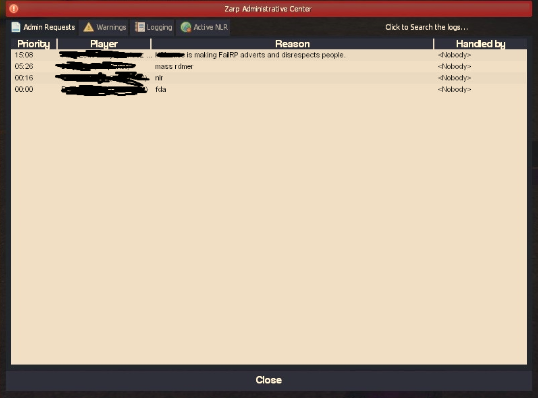
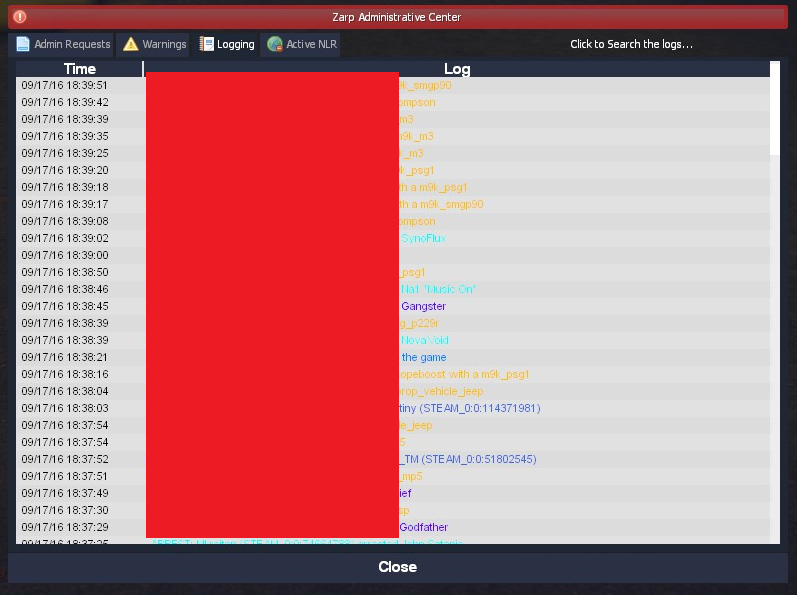
xRy4nCx Link to Steam Profile steamcommunity.com/id/xRy4nCx SteamID STEAM_0:1:96136901 Current Gametracker Profiles Server 1 - www.gametracker.com/server_info/darkrp.z...ayers/?query=xry4ncx Server 2 - www.gametracker.com/server_info/darkrp.z...ayers/?query=xry4ncx Server 3 - www.gametracker.com/server_info/usa.zarp...ayers/?query=xry4ncx Age 17 Estimated Server Time 885hrs Languages I speak English Explain how you feel that your time as a moderator will contribute to you becoming an admin. My time as a moderator has been exiting and fun. I have learned lots of new things about the Zarp community and met lots of kind people. The time I have been moderator I have learned alot of things such as certain commands. After being mod for over 2 weeks now I feel id be a great addition to the admin rank because I feel im very experienced now and I can deal with situations in a calm and peaceful manor. Explain a situation as a moderator you encountered that was an obstacle you had to work around (EG: defiant user). There was this one night where a few guys logged onto S2 (I was the only staff on at the time), and there only intention was to mass RDM after doing so I had to freeze them then took them all to a roof and then asked why they were doing that (They never spoke English). After trying to contact a higher up no one replied so I had to warn then kick each of them. If you had to write a facebook post to train a moderator in between 200-300 words, what would you say to give them the full grasp? Warning: Spoiler! [ Click to expand ][ Click to hide ] Hello there, Congratulations on becoming a moderator I hope you enjoy being staff and below I will be teaching everything you need to know as a moderator. 1. At some point during your gameplay you will see in the bottom left of your screen 2. When step 1 occurs that means someone has made an admin request and as you are a staf member now it is your job to handle these requests to help out the users as best as possible. You will then need to press F1 and your new F1 Menu will appear as shown below 3. The tab that is open right now on the picture above is the admin request part that shows all current admin requests and the time that it was started at by the left side. 4. The warning tab shows all the recent punishments on players since that session has been up 5. Logging is the general logs that shows kills, deaths, hits Etc. In the top right you can search for names to narrow it down for yourself 6. Active NLR tab is pretty self explanatory it shows all player with active NLR and what district Commands: /warn (SteamID)(Reason) /kick (SteamID)(Reason) How to use tab commands 1. If you need to TP to someone, Hold tab and then find their name and click "Goto" 2. If you need to bring someone to you, you can hold tab and find their name then click "Bring" or "Teleport" when clicking teleport make sure you aim where you want the person to appear at 3. Unbanning people from jobs. Hold tab then Click "Unban from job" Then select the job to unban them from. 4. Slaying, You should only slay people when they need to be stripped of their weapons for any reason and they wont drop the weapons. Also make sure to use a silent slay in public areas so you don't disturb other peoples RP experience. 5. Muting people, When muting people you should only really mute them for constant disrespect and micspam or any other constant use of communication "mute chat" Mutes the users chat users types in "mute globaly" mutes the users local voice chat 6. Then after a sit is finished you will then need to mark the F1 as finished then return the player by clicking "back" on the tab menu then selecting "last location" or "spawn" F6 Menu: Last but not least the F6 menu. As a staff you also get access to another menu called the F6 menu In the F6 menu you can check peoples recent warning to help guide you to the correct punishment for the users that you deal with Thank you for reading this quick step by step guide. I hope that the guide above helped you.. If you have any more questions please feel free to contact me on steam
Explain how you would handle the following situation:
Player x appeals their ban in great detail, apology and effort. You check the ban list and find that you banned them permanently for propspam, and that this is their first ban. How would your response to the appeal be? I would possibly update the ban to a lower rate or remove the ban depending on the situation and the tone he/she replied with Why I should be promoted (we recommend around 150 words). I think I should be admin because I fell like im ready for the rank im a very mature moderator and take situations that effect others very seriously and I aim to get to the bottom of things fairly. I love being a staff member and want to get to the next level of staff. I am on Zarp daily and am usually never inactive I spread out between all 3 SSRP servers. I used to own my own community and was staff on another community I was admin on. I know all the basics to FAdmin commands and if I were to be admin I would be able to handle more situations more swift and fast. Thank you for reading my Admin Application I hope you consider me to be promoted admin. |
|
|
Edited 9 years 9 months ago by xRy4nCx.
The topic has been locked.
|
|
Putting his 100% into the server and comes to me every day asking for help or info on specific rules.
He is doing a great job as a moderator. I like the effort you put in your facebook post |
|
|
Edited 9 years 9 months ago by ParaMontana.
The topic has been locked.
|
|
Thanks para appreciated
|
|
|
The topic has been locked.
|
|
Great lad and put 100% effort into his app. Also very mature mod and i feel he is ready to be admin.
|
|
|
Ex- SSRP Administrator
The topic has been locked.
|
|
Abuser,not friendly. |
|
|
(OOC) Sam Townsend: HellForce more like ScamForce ! troublemaker: im rich enough to fuck mia khalifa troublemaker: 5 times
The topic has been locked.
|
|
Great Moderator
See him doing F1's Great Guy |
|
|
Ex Minecraft Server Owner
Ex TTT Super Administrator Ex SSRP Administrator x2 Ex Deathrun Moderator Ex Murder Moderator
The topic has been locked.
|
|
Nice guy and very active!
Best of luck! |
|
|
The topic has been locked.
|
|
|
|
|
[ZARP-Notice]: You have left Hoppa
Edited 9 years 9 months ago by MrPing.
The topic has been locked.
|
|
Thanks for applying for staff at ZARP DarkRp! During our weekly staff meeting your application, question answers, game trackers and in-game warnings are checked and then the staff team votes on your application.
This time, the staff team have decided that you still need to work on your application and then apply again next week. To try and help you they have summarised some positives & negatives discussed during the meeting: Low F1 count this week, needs to spend more time helping out with F1's than basing.You can apply again at any time, and thanks for supporting ZARP! |
|
|
The topic has been locked.
|